- Shell 93.2%
- Python 5.4%
- C 0.9%
- HTML 0.5%
| Filename | Latest commit message | Latest commit date |
|---|---|---|
 921212bce0
fix (scanner): свежий Go (>=1.26) вместо захардкоженного go1.22.1 — сборка RealiTLScanner От уважаемого wrx861 |
||
| .github/ISSUE_TEMPLATE | ||
| assets | ||
| config | ||
| docs | ||
| modules | ||
| plugins | ||
| static/awesome | ||
| .gitattributes | ||
| CONTRIBUTING.md | ||
| install.sh | ||
| README.en.md | ||
| README.md | ||
| reshala.sh | ||
| SECURITY.md | ||
| WARP.md | ||
 RU
RU EN
ENReshala Tool 🚀
⚠️ ATTENTION: THIS PROJECT IS IN ACTIVE DEVELOPMENT ⚠️
Use at your own risk. Bugs and unpredictable behavior are expected.
🎯 THE BIG PICTURE
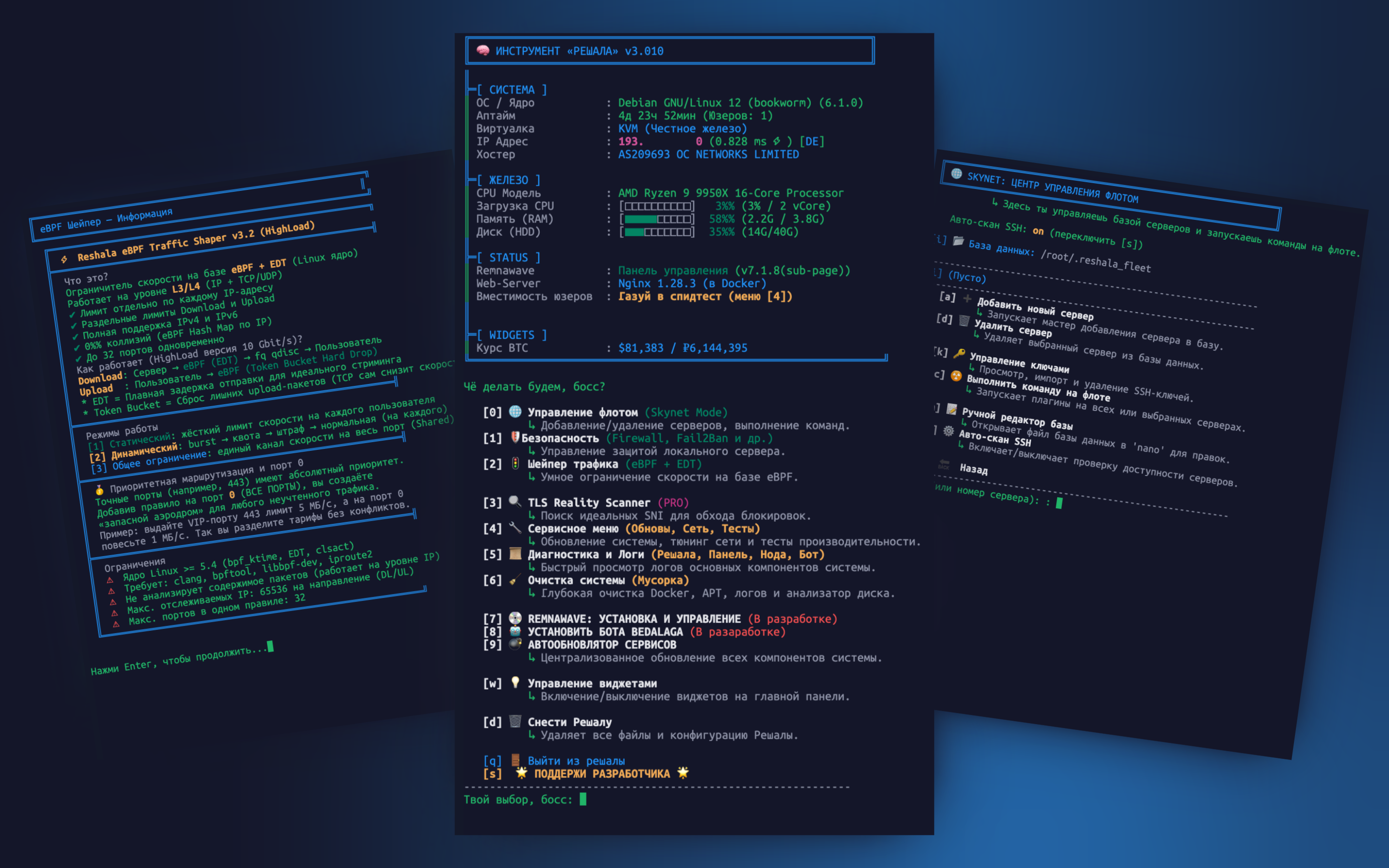
Reshala (from Russian "the Solver") is my personal "problem solver" for the world of Linux servers, and I'm sharing it with you. I've been grinding like hell to build this tool and save myself, and you, from the daily grind. This isn't just a script; it's a complete TUI framework for managing a single server or an entire fleet.
The philosophy is simple: maximum automation, minimum routine. I built this so the server works for you, not the other way around.
✨ KEY FEATURES
I've spent a ton of time thinking through every aspect of server management and bundling the best practices into convenient modules.
🌐 Skynet: Become the Master of Your Fleet
This is the holy grail and my main source of pride. Forget having 20 SSH windows open. Skynet is your single command center that turns a zoo of servers into an obedient army.
- 💥 Total Control: Manage dozens of servers like they're one. Add, remove, run commands on all of them at once. You're the boss here.
- 🚀 Teleport: Instantly jump into any machine on your list. Keys? I'll handle that for you.
- 🤖 Auto-Capture: Pointed Skynet at a new server without Reshala? Not a problem. It will parachute in, install itself, and report back when it's ready for duty.
- 🛠️ Smart Commands: This ain't just
uptime. I've sorted all commands into categories so you can surgically strike at problems: diagnostics, security, system.
🚦 Traffic Shaper: To Each Their Own
My other pride and joy. Enough of the "one-size-fits-all" bullshit where one heavy downloader ruins the connection for everyone else. This shaper is your personal bouncer, giving every single user their own, strictly enforced speed limit.
- ⚖️ Fair Share: You set the speed limit (e.g., 10 Mbps) for each user.
- 😎 Noisy Neighbors No More: No one will suffer just because someone else decided to download the entire internet. Everyone stays in their own lane and doesn't bother others.
- 🎛️ Simple Controls: Just go to the menu, set the port and the limits. That's it. No more
tc,htb, or other command-line hell. I did all that for you.
🎛️ The Informative Dashboard
A control panel, not a black screen
The moment you log in, you're greeted with a complete overview of your server's health:
- 📊 Visualization: Clear, concise bars for CPU, RAM, and disk usage.
- 📈 Performance Estimation: Runs an official Ookla Speedtest and calculates how many real users your node can handle.
- 🌍 Status Panel: All key information in one place—from kernel version and virtualization to ping and Remnawave status.
- ⚙️ Customization: Enable or disable widgets (crypto prices, Docker status, network activity) and adjust the dashboard's "load profile" to reduce resource consumption on weak VPSs.
🛡️ Comprehensive Security Module
Turning your server into a fortress
I've gathered a "must-have" toolkit for any public server, all in one place.
- 🔥 Firewall (UFW): A user-friendly wizard for setting up rules, with ready-made profiles for standard services.
- 👀 Fail2Ban: Automatically blocks attackers based on SSH logs.
- 🧠 Kernel Hardening (sysctl): Applies proven security settings at the kernel level to protect against spoofing, smurf attacks, and other threats.
- 📦 Backups: Create and restore your security configurations with a single click.
💿 Remnawave Lifecycle Management
Full control over the panel and its nodes
Reshala is Remnawave's best friend. I've automated everything I could.
- 🚀 Quick Start: Install the panel, a node, or both together in a few simple steps.
- 🌐 Management via Skynet: Install nodes on remote servers directly from the Reshala interface.
- 📜 Everything at Hand: Convenient access to logs, restarts, and installation management.
🐳 Smart Docker Management
Keeping Docker in check
Docker is a powerful tool, but it loves to eat up disk space. This module solves that problem.
- 🧹 Deep Clean: Removes unused images, networks, volumes, and stopped containers with your confirmation.
- 🎛️ Convenient Menu: Quick access to logs, stats (
docker stats), and the ability to start, stop, and restart any container.
🗺️ ROADMAP
I'm constantly working on the project. Here's what I plan to implement in the near future:
- [ ] 💿 Remnawave Panel: Installation, configuration, and management.
- [ ] 🤖 Bedolaga TG Bot: Installation and configuration.
- [ ] 🚀 Full Telegram Integration:
- Manage servers and your fleet via commands in a Telegram bot.
- Receive notifications about critical events (high load, Fail2Ban attacks, low disk space).
- Request the status of any server in the fleet with a single command.
- [ ] 🌐 Web Interface (Long-Term Goal):
- A lightweight web panel for visually monitoring the Skynet fleet.
- [ ] 🔔 Advanced Monitoring and Alerting:
- Configure thresholds for CPU, RAM, and disk usage to automatically send notifications.
- [ ] 🛡️ Enhanced Security Scenarios:
- Automated incident response (e.g., blocking IPs that initiate scanning attempts).
📥 INSTALLATION
Once. Forever. Copy, paste, press Enter.
Stable branch (main):
wget -O install.sh https://raw.githubusercontent.com/DonMatteoVPN/Reshala-Remnawave-Bedolaga/main/install.sh \
  && bash install.sh \
  && reshala
Dev branch (dev) — NOT for production
wget -O install.sh https://raw.githubusercontent.com/DonMatteoVPN/Reshala-Remnawave-Bedolaga/dev/install.sh \
  && bash install.sh \
  && reshala
🚀 HOW TO RUN
Just type in your console:
sudo reshala
If something goes wrong, remove traces of the failed installation:
rm -f /usr/local/bin/reshala && rm -rf /opt/reshala && rm -f install.sh
🧩 IF YOU WANT TO HACK ON THE CODE
This README is for users. If you are a developer who wants to extend Reshala, start with these documents. The project has recently been updated to a modern "Menu Manifest" architecture, which makes adding new features simple and fast.
docs/STYLE_GUIDE.md— (Must Read!) The single source of truth for coding style, UI conventions, and using internal helpers.docs/GUIDE_MODULES.md– How to write new modules and integrate them into the menu.WARP.md— The development journal and a high-level architecture overview.docs/GUIDE_SKYNET_WIDGETS.md– How to build your own widgets and Skynet commands.
The key rule: before writing any code, you must study docs/STYLE_GUIDE.md.
🥃 FINAL WORD
I built this tool so you can focus on your business, not on admin work. See a bug? Report it. Like a feature? Use it.
Good luck and stable profit. 👊
IF YOU USE IT AND DON'T STAR IT, YOU'RE A 🐓
Support the project 💸 (for beer & nerves):
Cryptocurrency:
- USDT (TRC20):
TKPnnmtJcDM7B2uCoLQciwZmS7f8ckMNx9💎 - Bitcoin (BTC):
bc1q235adg3dd4t43jmkpqka0hj305la43md38fc0n₿